
Goal: help players choose a simple app that tunes their instrument accurately. This guide compares smartphone apps, electronic tuners and tuning forks.
A thumb piano needs regular tuning to produce harmonious music. A central tine tuned to C should sound at C3 ≈ 261.626 Hz. A shift to 270 Hz creates a noticeable wrong note.
How does it work? Apps use the phone’s microphone and show the note’s pitch and its deviation in cents. Some versions are free; others offer a paid mode or display ads.
What to expect: dedicated tuners remain reliable and inexpensive. Apps are convenient and easy to carry. Below, we introduce popular apps on the App Store and Play Store and offer tips for improving detection on a smartphone.
Why use a kalimba tuning app today?
Today, many tools let you check the pitch and frequency of each note.
Quick comparison for 2025:
- Dedicated tuner: the most stable and often the most accurate. Typical price
- Tuning fork: provides A3 = 440 Hz and helps train your ear, but requires plenty of practice.
- App: the most accessible option. It turns your phone’s microphone into an instant tuning tool, although accuracy varies by device and algorithm.
What makes the thumb piano different?
Its metal tines are arranged in a row; their length determines the note. To tune the instrument, move each tine until it reaches the target frequency.
As a reference, C3 = 261.626 Hz. A shift, for example to 270 Hz, can put the note between two semitones and produce an out-of-tune sound that disrupts the harmony, especially when playing with a guitar.
| Method | Accuracy | Recommended use | Cost |
|---|---|---|---|
| Dedicated tuner | Very high | Frequent use, concerts | ≈ |
| Tuning fork | Moderate, depending on your ear | Tuning by ear | Low |
| App | Variable | Convenient and quick for beginners | Free or inexpensive |
Tip: try several reliable apps on your phone, then check the tuning by ear in a quiet setting. For more technical details, see our tuning guide.
Choosing a mobile tuner: essential criteria for players
Your choice of mobile tuner affects the quality and speed of tuning. Before installing one, check three things: frequency range, accuracy and stability in noisy surroundings.
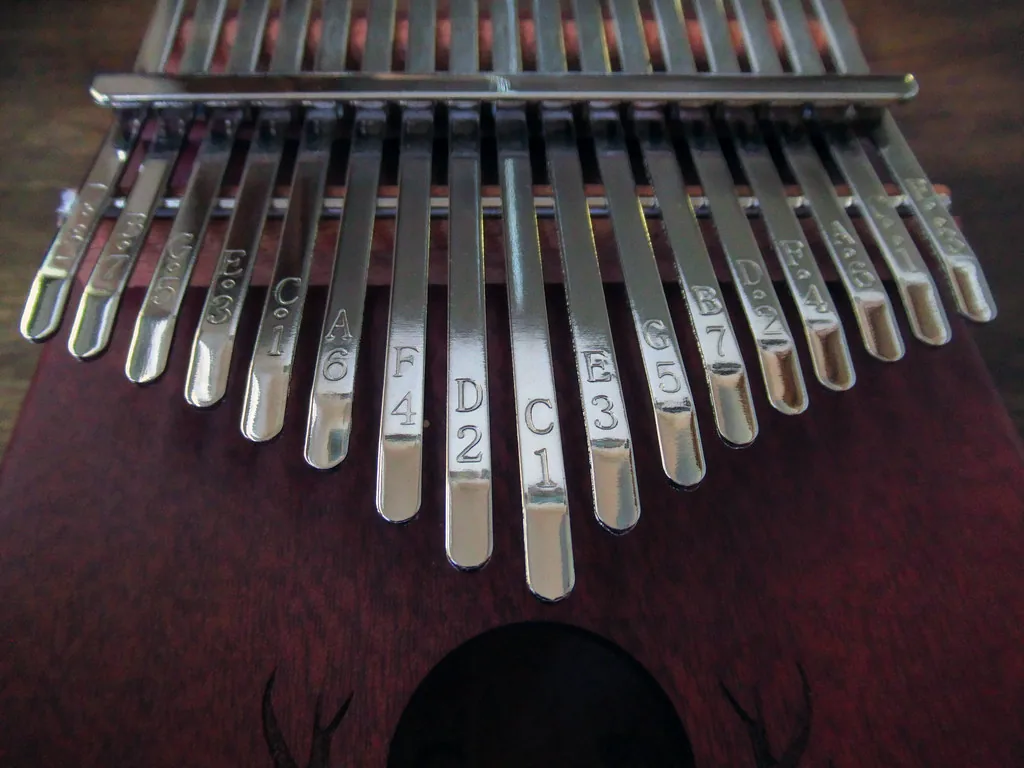
Choose a chromatic tuner: it covers every note and key. This is essential for tuning different instruments and for tuning a kalimba to alternative keys.
Accuracy and frequency range: look for a stable reading accurate to the cent. insTuner claims an accuracy of ±0.1 cent and a range from C0 to B8. Fine Chromatic Tuner covers approximately 70 to 550 Hz, which is useful for the thumb piano’s low and high notes.
Stability in noisy surroundings: choose an app that filters noise and steadies the display. BOSS Tuner and insTuner include noise reduction algorithms.
Interface and useful features: look for a needle or strobe display, frequency and note-name readings, adjustable sensitivity and a setting for the reference A pitch. Pano Tuner offers this kind of adjustment.
“Always test the tool on your own smartphone: microphone quality affects the results.”
Versions and ads: free versions often include ads and in-app purchases to unlock features. Try several, then keep your preferred tuner installed so you can tune before every session.
For a step-by-step guide to learning and tuning, see our short beginner’s guide.
Best free Android apps (Play Store)
If you want a quick, reliable Android option, these apps are worth trying.
DaTuner — Automatic sensitivity, a clear display and a color change when the note is in tune. It is very popular, with more than ten million downloads. Its free version offers paid options to remove ads.
gStrings Free
gStrings Free is a reliable chromatic tuner. It offers presets for various instruments and custom tunings. Useful for adjusting a tine outside standard tuning, it helps you tune quickly and cleanly.
Fine Chromatic Tuner
Fine Chromatic Tuner covers 70 to 550 Hz and displays the exact frequency. The app remains stable even with background noise. It is ideal for checking how accurately a tine is tuned.
Pitched Tuner and Pano Tuner
Pitched Tuner shows the note and frequency at the same time, so you can compare the needle with the value in Hz. Pano Tuner lets you adjust the reference A pitch and sensitivity through a simple Android interface.
| Name | Main strength | Range and accuracy | Free version and options |
|---|---|---|---|
| DaTuner | Automatic sensitivity, easy-to-read display | Wide range, good stability | Free with optional upgrades |
| gStrings Free | Chromatic tuning, presets | Wide range, reliable | Free |
| Fine Chromatic | Precise readings in Hz | 70 to 550 Hz | Free |
| Pitched Tuner | Note and frequency display | Suitable for beginners | Free with in-app purchases |
Tip: try two or three apps to find the one that responds best to your phone and instrument. For a broader comparison, see our guide on choosing a tuner.
Best free iOS apps (App Store)
On an iPhone, several tools can help you tune accurately in seconds. Here are three practical options, tested for their responsiveness and frequency displays across different instruments.
BOSS Tuner
BOSS Tuner offers hands-free tuning and a very wide detection range, from A#0 = 29.14 Hz to G8 = 6,271.93 Hz.
Its simple, fast interface is inspired by a BOSS pedal. This app remains a leading App Store option for demanding players.
insTuner / insTuner Free
insTuner Free claims an accuracy of ±0.1 cent and includes effective noise reduction.
The frequency display helps you tune each note accurately. You can upgrade the free version if needed.
Tuner Lite by Piascore
Tuner Lite has a responsive needle and a multilingual interface. The pro version adds advanced options and receives regular updates.
“Always test the interface and stability on your own device: microphone quality affects the results.”
These tuners are chromatic: they work with a wide range of instruments, even if some listings mention guitars.
| Name | Main strength | Range and accuracy |
|---|---|---|
| BOSS Tuner | Hands-free use, pedal-inspired interface | A#0 (29.14 Hz) to G8 (6,271.93 Hz) |
| insTuner Free | High accuracy, noise reduction | C0 to B8, ±0.1 cent |
| Tuner Lite | Responsive needle, multilingual interface | Wide range, pro version available |
Tip: download them from the App Store, compare their frequency readings and keep your favorite app for quick adjustments before playing.
Kalimba tuners: free apps worth knowing
When you need to tune quickly, some apps stand out for their ease of use and reliability.
Three versatile choices for every skill level
Pano Tuner, BOSS Tuner and gStrings meet the needs of beginners and experienced players alike.
Pano Tuner lets you set the reference A pitch and sensitivity. BOSS covers a very wide range, from A#0 to G8. gStrings offers useful presets for various instruments.
Accuracy and background noise
Fine Chromatic Tuner and insTuner stand out for their stable needle displays and noise handling.
Fine Chromatic remains stable between 70 and 550 Hz. insTuner displays a claimed accuracy of ±0.1 cent and filters distracting noise.
Simple interfaces and quick tuning
Tuner Lite, Pitched Tuner and DaTuner clearly display the note and frequency.
These tools let you fine-tune each tine in seconds. Try two apps on your phone and keep the one that responds best.
“Choose the app that works best with your instrument’s sound and your smartphone’s microphone.”
To try another Android app, see this page: Play Store listing.
Practical tips for successful smartphone tuning
Stable tuning starts with a quiet setting and good phone placement.
Position and background noise
Place the phone a few centimeters from the thumb piano, with its microphone facing the tines. Avoid touching the instrument while taking a reading.
Turn off fans and notifications to reduce interference. Even a stray sound can make the display waver and distort the measured frequency.
Calibration and checks
Set the app to A = 440 Hz unless you are using a different reference. Check each tine from the center outward, noting any deviation in cents.
If the tool offers both readings, check that the needle agrees with the frequency shown in Hz.
Step-by-step method and using the hammer
- Play the tine and read the displayed deviation.
- Adjust it slightly with a tuning hammer, without using an improvised object.
- Play the tine again and repeat until you reach the target note.
Remember: pulling the tine outward lowers its frequency; pushing it inward raises it. Make small adjustments.
“Take time to retune your instrument before every session: transport and changes in temperature affect the tines’ stability.”
| Step | Purpose | Quick tip |
|---|---|---|
| Placement | Steady the detection | Point the microphone at the tines from 5 to 15 cm away |
| Calibration | Set the reference frequency | Set A = 440 Hz, or another value |
| Adjustment | Reach the target note | Give the tine gentle taps with the tuning hammer |
| Checking | Keep the tines stable | Check neighboring tines after each adjustment |
For a method using minimal equipment, see our practical guide to tuning a kalimba with minimal equipment.
Alternatives to tuning apps and their limitations
Convenient and easy to carry, a smartphone is a useful option. It does, however, depend on its microphone and the app’s algorithm. Quality varies with the phone model and software.
Ads can interrupt tuning and distract you. Two apps may also show slightly different values for the same tine.
When to choose a dedicated electronic tuner
For rehearsals, studio work or the stage, a standalone tuner is still recommended. It offers stable, repeatable accuracy. Some models attach with a clip; detecting vibrations is useful for guitars and other stringed instruments.
The cost remains reasonable: many reliable models cost less than €30. A dedicated chromatic device makes alternative tunings easier and helps you tune an instrument such as a thumb piano.

| Advantage | Dedicated device | Smartphone |
|---|---|---|
| Independent operation | Yes | No; depends on the microphone |
| Stability in noisy settings | Very good; clip option available | Variable |
| Cost | Often affordable | Free or paid |
| Responsiveness on stage | Fast and reliable | May be affected by ads |
“Apps remain excellent, portable additions to your toolkit, but a hardware tuner is still the standard when consistent accuracy is needed.”
Conclusion
Careful tuning saves time and gives you confidence before you play.
To tune a kalimba efficiently, a chromatic tuning app or dedicated tuner remains the quickest tool. Pano Tuner, BOSS Tuner and gStrings are versatile. insTuner and Fine Chromatic focus on accuracy; DaTuner, Pitched Tuner and Tuner Lite favor ease of use.
Method: try two or three apps from the App Store or Play Store, display the frequency, C3 = 261.626 Hz, and check each tine in turn. If you often play with a guitar or other stringed instruments, consider switching to a hardware tuner.
Share your feedback on the features and version you use. For a complete list, see our selection of apps.